



Swapping-Steuerungen brechen Ihren Fluss
Tastatur, Maus und Scrollen teilen
Ordnen Sie Displays passend zu Ihrem Schreibtisch und wechseln Sie an einem gemeinsamen Rand. Input-Handoff streamt den anderen Bildschirm nicht.
 ArcRelay Mouse
ArcRelay Mouse
Hergestellt für · Multi-Computer-Mitarbeiter, Entwickler und Schreibtisch-Setups
Bewegen Sie sich zwischen Computern, ohne Tastaturen auszutauschen, oder verwenden Sie ein Telefon-Trackpad für eine schnelle Eingabeaufgabe weg von Ihrem Schreibtisch.
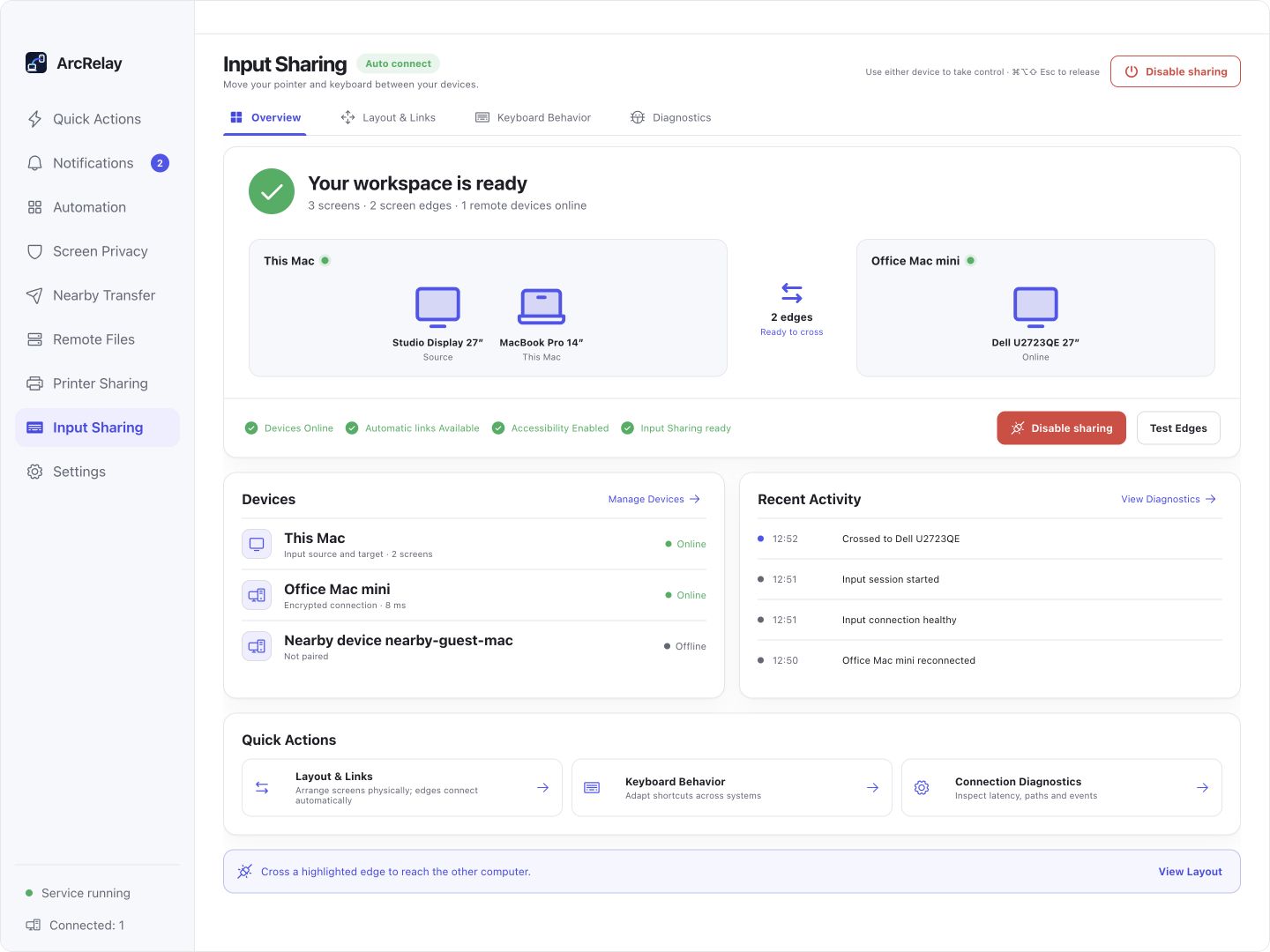
Suite Input Sharing Übersicht: Anzeigepositionen, Verbindungsstatus und aktuelle Eingabeaktivität.
Von einer englischen Entwicklungsvorschau des aktuellen Desktop-Frontends mit Beispielgeräten und Inhalten erfasst. Die installierte Version bestimmt die Schnittstelle und die verfügbaren Features.
FÜR IHREN ALLTAG
Halten Sie Ihre Hände auf die gleichen Steuerungen wie Arbeit bewegt sich zwischen Computern. Ordnen Sie die Displays, dann überqueren Sie einen benachbarten Rand, um fortzufahren.
Swapping-Steuerungen brechen Ihren Fluss
Ordnen Sie Displays passend zu Ihrem Schreibtisch und wechseln Sie an einem gemeinsamen Rand. Input-Handoff streamt den anderen Bildschirm nicht.
Die gleiche Verknüpfung verhält sich unterschiedlich über Systeme hinweg
Übersetzen Sie die Bearbeitungshortcuts für das Zielsystem, oder behalten Sie das physische Tastenverhalten für Terminal-Arbeit.
Sie brauchen einen klaren Weg zurück, wenn eine Verbindung fällt
Trennen oder Deaktivieren von Freigaben gehaltene Eingaben. Command/Ctrl + Alt + Shift + M gibt die Steuerung frei und zentriert den lokalen Zeiger.
MIT EINER AUFGABE BEGINNEN
Anzeigen in der Cross-Screen-Eingabe arrangieren; Größe, Skalierung und Rotation beeinflussen die Übergaberegionen.
Überprüfen Sie Identität, gewähren Sie Eingabezugriff und füllen Sie die Systemeingabeberechtigungen des Zielcomputers aus.
Überqueren Sie einen benachbarten Rand, um Computer zu wechseln. Command/Ctrl + Alt + Shift + M gibt die Steuerung frei und zentriert den lokalen Zeiger.
BEVOR SIE BEGINNEN
macOS benötigt Zugriff auf Barrierefreiheit; Telefon-Ferneingabe unterstützt Linux noch nicht. Input Sharing streamt keinen entfernten Desktop.
Diese Seite beschreibt den fokussierten Produkt-Wert; sie gibt keine eigenständige Paketfreigabe bekannt.
Lesen Sie das Feature und die Berechtigung DetailsArcRelay Suite bringt Input-, Content- und lokale Aufgaben über vertrauenswürdige Geräteverbindungen zusammen.