



Chat oder Mail erscheint beim Fensterwechsel
Geschützte Anwendungen auswählen
Fügen Sie Apps zur Schutzliste hinzu und wählen Sie eine Milchglas- oder einfarbige Maske. Sichtbare Fenster ohne Fokus werden ebenfalls erfasst.
 ArcRelay Privacy
ArcRelay Privacy
Hergestellt für · Für Bildschirmfreigaben, Präsentationen und Tutorial-Aufnahmen
Wählen Sie Fenstermasken für Chat oder E-Mail und prüfen Sie vor der Präsentation die tatsächlich geteilte Ansicht.
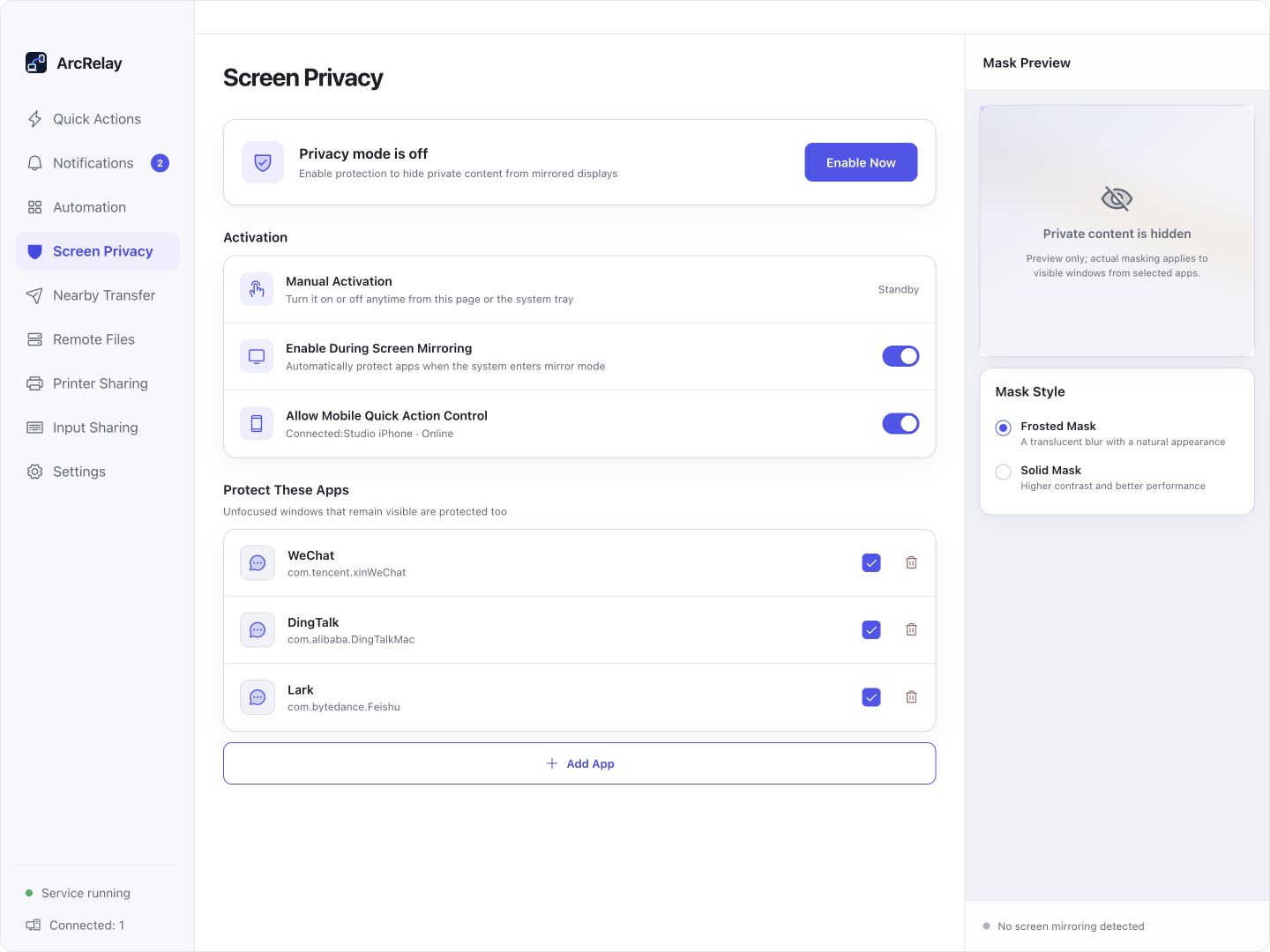
Suite Screen Privacy: App-Auswahl, Aktivierung und Maskenvorschau. Überprüfen Sie die Zuschaueransicht in Ihrem Meeting-Tool.
Von einer englischen Entwicklungsvorschau des aktuellen Desktop-Frontends mit Beispielgeräten und Inhalten erfasst. Die installierte Version bestimmt die Schnittstelle und die verfügbaren Features.
FÜR IHREN ALLTAG
Wählen Sie die Apps, um vor einer Sitzung oder Aufnahme zu maskieren, dann überprüfen Sie die Zuschaueransicht vor der Präsentation.
Chat oder Mail erscheint beim Fensterwechsel
Fügen Sie Apps zur Schutzliste hinzu und wählen Sie eine Milchglas- oder einfarbige Maske. Sichtbare Fenster ohne Fokus werden ebenfalls erfasst.
Das Treffen beginnt, bevor Sie bereit sind
Bereiten Sie die App-Liste im Voraus vor und aktivieren Sie den Schutz von der Seite oder dem Infobereich. Konfigurieren Sie die Fernumschaltung nur bei Bedarf.
Ihr eigener Bildschirm ist kein Beweis für die Zuschaueransicht
Überprüfen Sie die Ausgabe in dem Sitzungs- oder Aufzeichnungstool, das Sie verwenden. Capture Methoden unterscheiden sich, und eine Maske ist weder Dateiverschlüsselung noch ein Bildschirmschloss.
MIT EINER AUFGABE BEGINNEN
Wählen Sie Apps in der Präsentation Privatsphäre und wählen Sie eine mattierte oder solide Maske.
Aktivieren Sie den Schutz über die Feature-Seite oder das Infobereich; ermöglichen Sie das Fernschalten nur bei Bedarf.
Überprüfen Sie die Zuschaueransicht in Ihrem eigentlichen Meeting- oder Aufnahmetool, bevor Sie sich auf eine Maske für sensible Informationen verlassen.
BEVOR SIE BEGINNEN
Fenstermasken sind keine Verschlüsselung oder Bildschirmverriegelung und können nicht jede Erfassungsmethode abdecken. Linux fehlt ein gleichwertiger nativer Schutz.
Diese Seite beschreibt den fokussierten Produkt-Wert; sie gibt keine eigenständige Paketfreigabe bekannt.
Lesen Sie das Feature und die Berechtigung DetailsArcRelay Suite bringt Input-, Content- und lokale Aufgaben über vertrauenswürdige Geräteverbindungen zusammen.